> From the [Strife developer docs](https://strife.app/docs/reference/fields/table-input). Every page is listed in [llms.txt](https://strife.app/docs/llms.txt).

# Table Input~

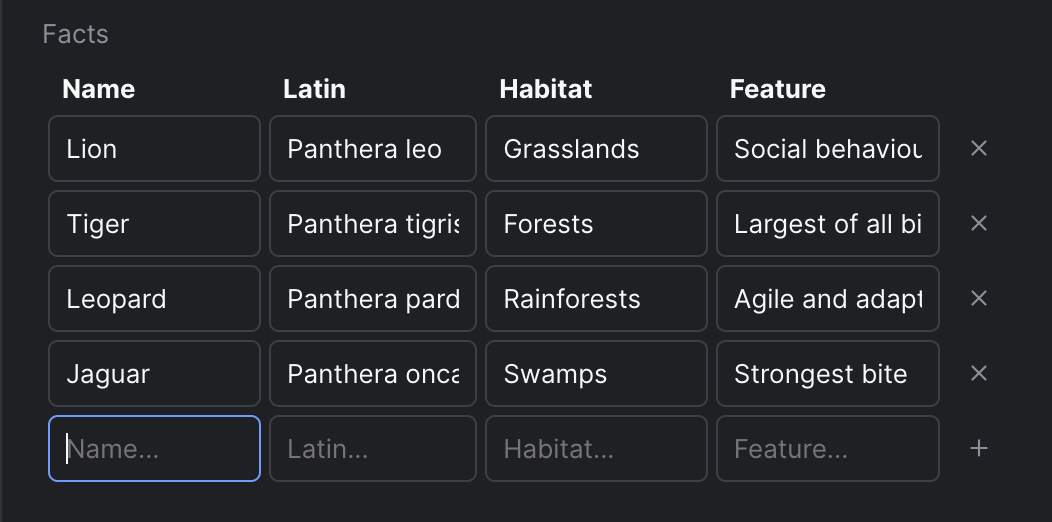
The Table Input field enables users to input data in a tabular format, storing it as an array of objects in the database.

<figure><img src="https://strife.app/docs/assets/Screenshot%202023-10-27%20at%2010.58.26.png" alt="" width="375"><figcaption><p>Strife Studio screenshot of an Table Input field</p></figcaption></figure>

> [!WARNING]
> The tilde (**\~**) denotes that the field is available in developer preview only.

### Settings

In addition to the basic settings, this section provides information about unique settings and configurations specific to this field.

> [!NOTE]
> You can find a comprehensive list of all basic settings in the ['Overview' section](https://strife.app/docs/reference/fields.md).

<table><thead><tr><th width="232">Option</th><th>Description</th><th data-hidden></th></tr></thead><tbody><tr><td>Headers</td><td>A JSON array of strings specifying the column headers. E.g <code>["Name","Latin","Habitat","Feature"]</code></td><td></td></tr><tr><td>Input types</td><td>Specifies the input types for each header using a JSON array of strings. Supported types include 'text', 'number', 'date', 'datetime-local', 'email', 'month', 'tel', 'time', 'url', 'boolean', and 'multistring'. E.g. <code>["text","text","text","text"]</code></td><td></td></tr><tr><td>Options</td><td>A JSON object containing the options for every 'multistring' input type. Use camel case header as property name. E.g. <code>{"columnHeader": []}</code></td><td></td></tr><tr><td>Sortable</td><td>Enables sorting in the Table Input field, which allows users to click on column headers for sorting.</td><td></td></tr><tr><td>Sort by</td><td>Specifies the default sorting column header.</td><td></td></tr><tr><td>Sort direction</td><td>Specifies the default sorting direction.</td><td></td></tr><tr><td>Searchable</td><td>Enables search for large data sets.</td><td></td></tr><tr><td>Display row numbers</td><td>If enabled, row numbers will be displayed in the Table Input field.</td><td></td></tr><tr><td>Exportable</td><td>If enabled, the table can be exporterd/imported to/from CSV</td><td></td></tr><tr><td>Export delimiter</td><td>Choose a delimiter for the export; file formats (CSV, TSV, TXT)</td><td></td></tr></tbody></table>

### Define with JSON

When defining templates using JSON, this field is represented using:

* **Component Name:** `str-table-input`
* **Type:** `table-input`
* Reference ID: `str-table-input`

The settings above map into the `editor.attributes` object inside the JSON definition.

```json
{
  ...
  "editor": {
    "name": "str-table-input",
    "type": "table-input",
    "propertyName": "...",
    "attributes": {
      "sortable": true,
      "sortBy": "...",
      "sortDirection": "asc",
      "searchable": false,
      "rowNumbers": false,
      "exportable": false,
      "exportDelimiter": "..."  //','|'\t'|';'|'|'
    },
    "options": {
      "headers": "...",
      "inputTypes": "...",
      "options": "...",
    }
  },
  ...
}
```

### Live preview

> [!NOTE]
> This field does not have any default Strife Web Components. Custom live preview implementations are fully supported.

> [!NOTE]
> For more information on live preview and Strife Web Components, please refer to the [Live preview documentation](https://strife.app/docs/reference/live-preview.md).
