> From the [Strife user guide](https://strife.app/docs/user-guide/working-with-content/lifecycle-of-a-page). Every page is listed in [llms.txt](https://strife.app/docs/llms.txt).
# Lifecycle of a page
In Strife, you never need to worry about losing any of your work. Strife saves all your changes for you.
### Draft
A draft in Strife is a working copy of your page. Strife saves a draft when you leave a field by clicking outside the area or moving to a new field in the edit panel to the right. As an editor, you are notified when Strife saves a draft in the interface's upper right corner.
Changes saved
You are not able to undo or step back in draft history in Strife. You can only return to the latest saved draft by choosing the document from the draft list at the pre-defined filter list on the left-hand side of the interface.
Pre-defined filters
### Published
The published version is the page that is reachable by your audience.
### Archived
Archiving a page means unpublishing a page on your website. You can archive a page by clicking the three dots to the left in the document list and then choosing **Archive** in the menu. Archiving a page with descendants will automatically archive all the related pages.
Archiving documents
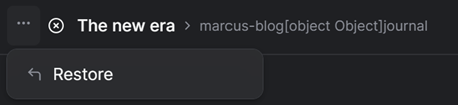
If you wish to undo your archive page, go to the **Archive** list and select **Restore** from the menu. Restoring a document will republish your page on your site.
Restore archived page
### Revert
Reverting a page will erase all unpublished changes on a page. Reverting a page gives the editor a clean sheet.
Reverting to latest published page
### Discard
If a page doesn't have a published version, discarding a page will permanently delete the draft, and the page will not be able to restore.