Reference Fields
Rich Content
The Rich Content field empowers editors to create dynamic and visually appealing content, which is then stored in the database as HTML.
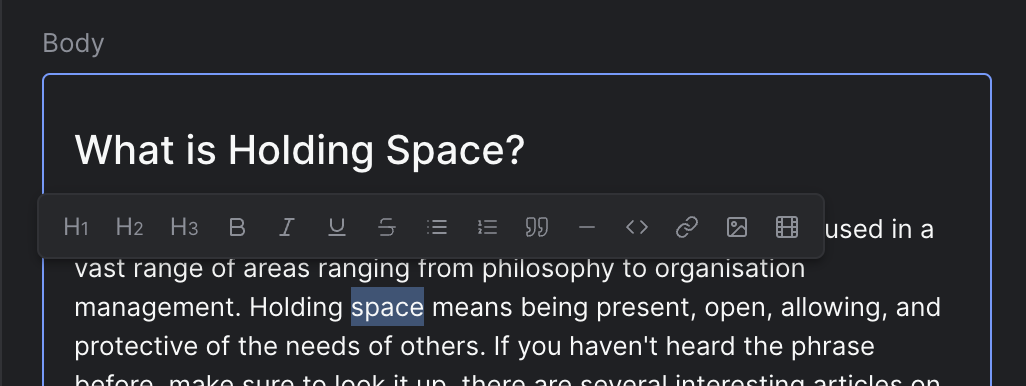
Strife Studio screenshot of a Rich Content field
Settings
In addition to the basic settings, this section provides information about unique settings and configurations specific to this field.
You can find a comprehensive list of all basic settings in the 'Overview' section.
| Option | Description |
|---|---|
Menu buttons | Selects which buttons appear in the slash-menu and which heading levels (H1–H6) are enabled. In Strife Studio today only the heading levels take effect; the new interface also limits the other buttons. See Menu button values |
Placeholder Document~ | Specifies a node scheme that the document must follow. |
Lock Placeholder Document~ | Specifies whether the user should be prevented to add more nodes after what's specified under the placeholder-document. |
Menu button values
Pass menuButtons as an array of strings. Heading values (heading1 through heading6) control which heading levels the editor accepts. Other values enable the corresponding slash-menu items.
| Value | Description |
|---|---|
heading1…heading6 | Enable the corresponding heading level. Include only the levels you want available. |
bulletList | Unordered list slash-menu entry. |
orderedList | Numbered list slash-menu entry. |
checkList | Task list with checkboxes. |
image | Image insert slash-menu entry. |
video | Video insert slash-menu entry. |
table | Table insert slash-menu entry. |
Inline formatting (bold, italic, underline, strikethrough, link, blockquote, details) is always available from the text-selection menu, independent of menuButtons.
Define with JSON
When defining templates using JSON, this field is represented using:
- Component Name:
str-textarea - Type:
html - Reference ID:
str-textarea|html
The settings above map into the editor.attributes object inside the JSON definition.
{
  ...
  "editor": {
    "name": "str-textarea",
    "type": "html",
    "propertyName": "...",
    "attributes": {
      "menuButtons": ["heading1", "heading2", "bulletList"],
      "placeholderDocument": "{\"content\":\"heading paragraph+\",\"placeholders\":{\"heading\":\"Enter title\",\"paragraph\":\"Start writing…\"}}"
    }
  },
  ...
}
Placeholder Document
Developer preview. API may change.
placeholderDocument takes a JSON string with two optional keys:
content— a ProseMirror content expression that constrains which node types the document contains and in what order. Examples:"heading"(exactly one heading),"heading paragraph+"(one heading followed by one or more paragraphs),"heading paragraph*"(heading with optional paragraphs).placeholders— an object mapping ProseMirror node-type names to placeholder text shown when the node is empty.
Example configuration:
// Rendered as a JSON string in the template attribute:
{
  "content": "heading paragraph+",
  "placeholders": {
    "heading": "Enter title",
    "paragraph": "Start writing…"
  }
}
Valid node-type names for placeholders (and content):
heading— all levels use the same node type; thelevelattribute (1–6) is set by the editor. Useheading, notheading1.paragraphbulletList,orderedList,listItemblockquotecodeBlockimage,video
To produce the final attribute value, JSON-stringify your config object — the JSON must be embedded as a string in the placeholderDocument attribute. When building templates in code:
attributes: {
  placeholderDocument: JSON.stringify({
    content: "heading paragraph+",
    placeholders: {
      heading: "Enter title",
      paragraph: "Start writing…"
    }
  })
}
Live preview
The compatible Strife Web Components for a Rich Content field are container components only.
For more information on live preview and Strife Web Components, please refer to the Live preview documentation.