Open a page in Strife from your website
The Edit in Strife toolbar on your website takes you from the page you are viewing to the same page in Studio, once you have connected your browser.
When you browse your published website, you can jump straight into Strife on the page you are looking at. A small toolbar at the right edge of the page offers Edit in Strife (Redigera i Strife on pages in Swedish). It is shown only to you, in the browsers you have connected, never to your visitors.
The toolbar is a small tab with the Strife mark. Point at it, or tap it, to open it.
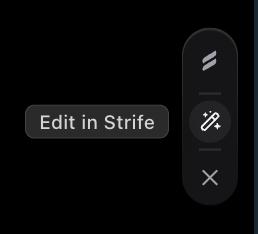
The toolbar, opened
Your website's developer needs to have installed the toolbar first (see Open in Strife: a toolbar on your site in the developer docs).
Connect your browser
You connect a browser once: open a page from Strife with the play button. The page opens in a new tab with the toolbar already there, and that browser stays connected. Keep the Strife tab open until the page has loaded.
The connection lasts 30 days per browser. In Safari it also ends after a week of not visiting the site. Connect again the same way.
Open a page
Click Edit in Strife. Strife opens in a new tab on the document behind the page. If you are not signed in you are asked to sign in first. If the page has no document of its own, for example a listing, Strife opens on the team's content list instead.
Hide the toolbar
Click ×. The toolbar disappears from that browser until you open a page from Strife again.
Good to know
- The toolbar never shows inside Strife's own preview.
- If the toolbar opens Strife but you land somewhere unexpected, you may not be a member of the team behind that website.
- Sites in several languages open in the editor's current language, not necessarily the language of the page you came from.