Compose a page
Create a page with Compose: where it goes, its template and its name, or make a copy of an existing page.
Every page has an origin, the page it sits under, and a template, which decides its layout and which fields you can edit. The origin builds the hierarchy inside Strife; it doesn't have to match the menus on your website.
Compose creates any kind of document your team has a template for. Most are pages, but a document can also be, for example, content that several pages reuse (see Chapters).
Create a page
Click Compose at the top of the content list. Or open a page's menu in the list and choose Compose ▸ a template, to create the new page under that page.
At the top of the dialog are the origin and the template, for example Blog › Article; click either one to change it. Type the page's name, and add a label or choose its language if you like. Then click Create document.
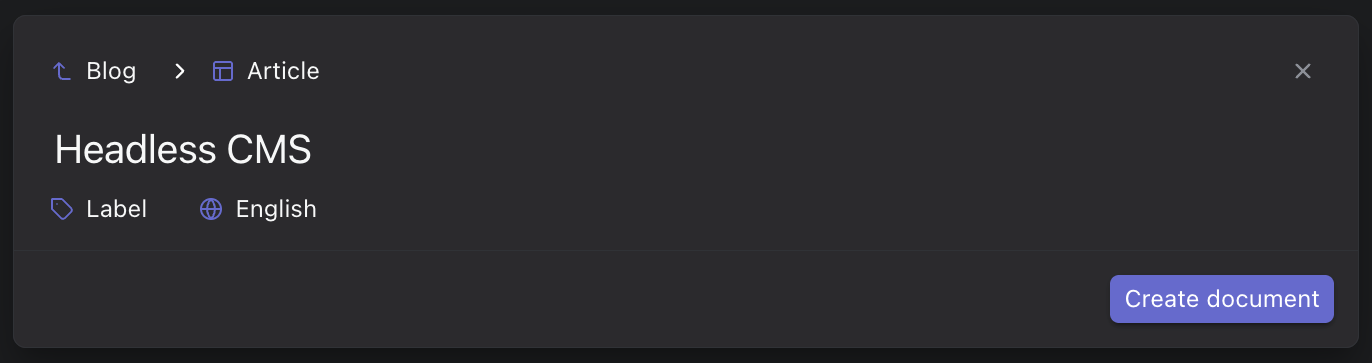
The Compose dialog
When you compose from a page's menu, Strife fills in the origin and offers only the templates that may go under that page.
Make a copy
To start from an existing page, open its menu in the content list and choose Make a copy.... The same dialog opens with the name "(copy)" added; click Create copy.
When the template knows its parent
A template can declare which kind of page its documents belong under — a blog post under the blog page, for example — or one specific page. (Developers set this with from in the template definition.) When you compose such a page, the origin field follows that rule:
- If exactly one page matches, it is already selected.
- If several match, the origin list and its search show only those pages.
- If none exists yet, the field works as usual, and a hint tells you which kind of page is expected — or, when the template names a specific page that is not in this workspace, which page it looked for.
Composing from a row's Compose menu keeps that row as the parent only when it matches the rule, and the menu only offers templates that may be placed under that row.
Compose in the new interface
This section describes Studio's new interface, which is not yet available to everyone. If your Studio looks like the rest of this guide, the sections above apply to you.
The new interface has no origin field. Strife chooses where the new page goes and shows it to you before you create the page.
Open the dialog with the New document button at the top of the navigation, by pressing C, or with New document... in the command menu. To create the page under a particular page, open that page's menu in the content list and choose New.... Choose the team and the template at the top of the dialog, type the page's name, and click Create document.
A tab under the dialog shows where the page will go, followed by its name as you type it, for example About us → Team. The page goes:
- Under the page you chose New... on, or otherwise the page that is highlighted in the content list, if the template allows that page as its parent. The highlight is on the row the pointer last moved over, or on the row you reached with the arrow keys, and it stays there when you move to the New document button.
- Otherwise, under the page the template allows, if it allows exactly one.
- Otherwise, under your site's home page, the page whose URL is
/.
A team without a home page gets the new page at the top level. If the team has no pages at all yet, the new page becomes its home page: its URL is /. That goes for a page with a URL of its own whose template doesn't say which page it belongs under. A team that already has pages can make one of them the home page with Set home page (see Make a page the home page).
A document without a URL of its own, such as content that several pages reuse, always goes at the top level, and it is never a parent itself: New... is greyed out on its menu, and highlighting it doesn't count. The same goes for an archived page. Point to a greyed-out New... to see why. If you switch to another team in the dialog, the page you started from no longer counts.
To put the page somewhere else afterwards, use Move to (see Move a page).
A new team
When a team has no documents yet, the content list says No pages yet and has a Create home page button. It opens the dialog with a template for the home page already chosen: the page template whose name says so, such as Home, Start page or Landing page, or otherwise the first one by name. Type the page's name and click Create document. The page becomes your site's home page.
If the list says No page types yet instead, the team has no templates for pages yet. A developer adds them by pushing the site's schema with the Strife CLI. When the team has templates for other kinds of documents, New document creates one of those.