Move a page
Move a page under another page by changing its origin with Set origin... in the content list. The pages under it move along.
A page's origin is the page it sits under (see Compose a page). To move a page, change its origin:
- In the content list, open the page's menu and choose Set origin....
- A list of pages opens. Type to search, and choose the new parent.
- Studio confirms with "The document has been moved."
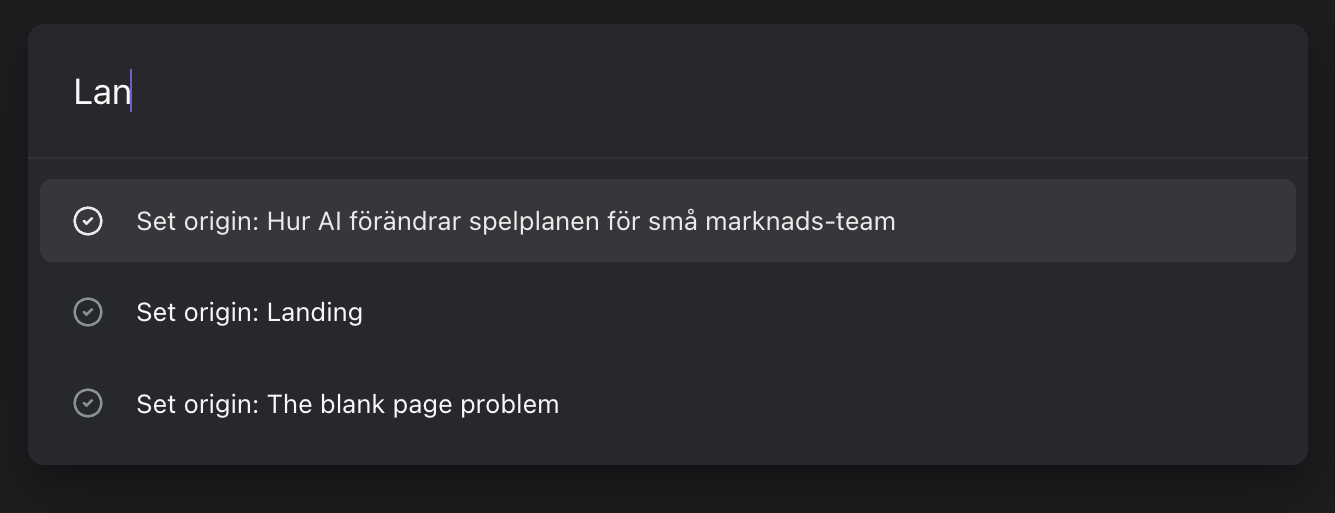
Choosing a new parent with Set origin
The pages under the page move with it.
A published page gets a new address when it moves, and so do the pages under it.
If the page's template declares which kind of page it belongs under, or one specific page, the list shows only those pages, and the search field says which kind. When none of them exists yet, every page is listed, and the search field says that too.
Archived pages can't be moved. Restore the page first (see Lifecycle of a page).
Move a page in the new interface
This section describes Studio's new interface, which is not yet available to everyone. If your Studio looks like the rest of this guide, the section above applies to you.
In the new interface, Set origin... is called Move to:
- In the content list, open the page's menu and point to Move to. Or highlight the page in the list, or open it, press Command+K (Ctrl+K on Windows) and choose Move to....
- Each page in the list shows where it sits. Type to filter the list, and choose the new parent.
- Studio confirms with "Moved under" and the name of the new parent.
The page's current parent is in the list too, marked Current parent, but you can't choose it. A page can't move under itself or under a page below it.
When the page's template allows only some parents, the list shows only those, under a heading that names them. When none of them exists yet, every page is listed, and the heading says so.
In the page's menu, Move to is always there, but it's greyed out when the page can't move: when it has nowhere else to go, when it's archived or has no URL of its own, while you're offline, or when your role doesn't allow it (a contributor can't move a published page). Point to it to see why. In the command menu, Move to... appears only for a page that has somewhere to go.
A page with a scheduled update can't move until you unschedule it: the scheduled update is a copy of the whole page, so publishing it would put the page back where it was.
Make a page the home page
The home page is the page at your site's address, /. The other pages go under it. A team without one can make one of its pages the home page:
- In the content list, open the page's menu and choose Set home page. Or highlight the page in the list, or open it, press Command+K (Ctrl+K on Windows) and choose Set home page.
- Studio confirms that the page is now the home page.
The page's URL becomes / in every language it has. After that, its slug shows / and can't be changed.
A published page gets a new address, /, and so do the pages under it.
Set home page is there only while the team has no home page, and only for a page at the top level with a URL of its own that isn't archived and whose template doesn't say which page it belongs under. It's greyed out while you're offline, when your role doesn't allow it (a contributor can't change a published page this way), or when the page has a scheduled update. Point to it to see why.